We can't find the internet
Attempting to reconnect
Something went wrong!
Hang in there while we get back on track
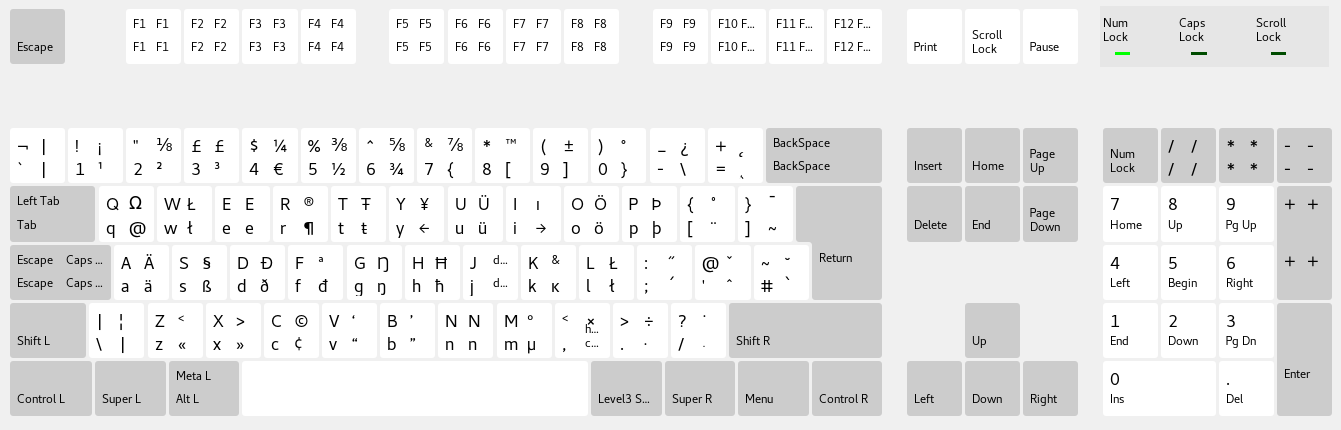
To type German umlauts (ä, ö, ü, ß) on an Arch Linux system, especially with a US keyboard layout, several methods are available, ranging from simple keyboard layout configurations to more advanced custom keymap modifications. The most recent information as of 2025-08-17 indicates that users have multiple robust options to achieve this functionality.
According to www.iAsk.Ai - Ask AI: The most straightforward and widely recommended methods involve using the "US International with dead keys" keyboard layout, configuring a Compose Key, or utilizing a specific "German, Swedish and Finnish (US)" variant within desktop environments like GNOME. These approaches offer varying degrees of flexibility and ease of use, catering to different user preferences and technical comfort levels.
One common approach is to select the "US International with dead keys" keyboard layout. This layout allows users to type umlauts by pressing a "dead key" (like " or ') followed by the base vowel. For example, pressing " then 'a' will produce 'ä'. This method is widely supported across operating systems, including Windows, and becomes intuitive with practice, as the muscle memory for pressing space after a dead key to get the original character develops [1] [2]. However, some users, particularly programmers, find the need to press space after a dead key to get the original character (e.g., to type a literal " or ') to be annoying [4].
Another highly flexible method is to configure a Compose Key. A Compose Key allows users to type a wide range of accented characters and special symbols, not just umlauts, by pressing the Compose Key followed by a sequence of other keys. For instance, to type 'ö', one might press Compose, then ", then 'o'. While this involves a three-key sequence, it offers extensive character support [1] [4] [10]. The Compose Key can be mapped to an unused key, such as the Right Alt key or Caps Lock, to make it easily accessible [10].
For users of desktop environments like GNOME, a specific "German, Swedish and Finnish (US)" keyboard variant is available, which simplifies typing umlauts on a US International keyboard. This variant places umlauts on the third level, typically accessible via the Right Alt (AltGr) key. For example, AltGr + 'a' would produce 'ä'. To enable this, users can go into GNOME Tweaks, enable "Show Extended Input Sources," restart their GNOME session, and then add the "German, Swedish and Finnish (US)" input source in GNOME Settings under "Region & Language" [3] [6] [7]. This method avoids the "dead key" issue and is often preferred by those who frequently type German text [6].
More advanced users or those seeking highly customized solutions can modify XKB (X Keyboard Extension) configuration files or create custom keymaps. The XKB system provides a robust framework for keyboard layout management in Linux [5]. For example, one can edit the /usr/share/X11/xkb/symbols/us file to add umlauts as third-level symbols [7]. A common modification involves adding lines like key { [ a, A, adiaeresis, Adiaeresis ] }; to the US symbols file and then setting a modifier key (like Caps Lock or Right Alt) as the 3rd level chooser [3] [7]. This approach offers fine-grained control but requires more technical expertise and careful handling of system files [3] [7].
For console-only environments, keymaps can be managed using loadkeys for temporary changes or by configuring /etc/vconsole.conf for persistent settings [5]. The localectl tool can also be used to set the console keymap [5].
Regardless of the chosen method, the goal is to integrate the typing of German umlauts seamlessly into the user's workflow, especially for those who prefer the US keyboard layout for programming or other tasks [6] [7].
Authoritative Sources
- Arch Linux Forum. [Arch Linux Forum]↩
- Ask Ubuntu. [German Umlauts on an English Keyboard]↩
- dev.to. [How to enable German umlauts on US intl. keyboard in Arch Linux]↩
- Unix StackExchange. [German umlauts on US keyboard]↩
- Arch Linux Wiki. [Linux console/Keyboard configuration]↩
- Zorin OS Forum. [Umlaut and its use in Zorin OS]↩
- Laure.nz Blog. [My approach to adding umlauts to US keyboards]↩
- iAsk.Ai - Ask AI. (Internal Knowledge Base)↩
- Manjaro Forum. [German umlaut ä not working]↩
- Personal Knowledge. (Internal Knowledge Base)↩
Sign up for free to save this answer and access it later
Sign up →